Introduction
The Advanced Colonies modpack is built around MineColonies, while trying to provide a well-integrated variety of technology, magic, nature, and transportation mods.
This guide is VERY MUCH a work in progress, it probably has mistakes!
- Deathwatch: deaths.canine.systems
Getting Started
If you don’t haven’t joined before, this is how to set it up:
- Download and install Prism Launcher
- Run Prism Launcher
- Drag this link to the main Prism Launcher window
- Click “OK”
- Launch the “advanced-colonies” instance and connect to the server
- When it asks if you want to download an external modpack, click “Download”
- When it asks to restart Minecraft, click “Yes, close the game”
- Launch Minecraft and connect again
There is also a YouTube video showing steps 3 through 8.
Discord Integration
There is now chat integration between Discord and Minecraft. This includes pictures and emoji going in both directions.
It includes the ability to take Minecraft screenshots, and share them with Discord from in the game.
However, the Essentials mod slightly conflicts with this by hiding the message confirming your screenshot was taken. You can fix this by going to the pause menu -> Settings (not Options) -> Quality of Life and enable the “Screenshot message” setting.
Here’s a video showing how to do so:
After making this change, if you press the F2 to take a screenshot, you can open the text chat and click “Share to chat” to share it with everyone.
Modpack Updates
We handle client-side modpack updates via Automodpack.
This means you (hopefully!) will never have to manually install an updated modpack!
When we update the modpack on the server, everyone who connects will be prompted to download updates.
The downside is you’ll need to restart Minecraft afterwards. The upside is that’s all you’ll need to do.
Major Updates
3.384: Cataclysm with Friends
Changes:
- Being able to view everyone on your maps works again.
- Made the saddle and bundle show up in EMI
- Fixed rice unification.
- Added mods:
This update went live on June 1, 2026 at 11:40pm EDT.
Cataclysm
The Cataclysm mod adds a bunch of difficult dungeons, boss fights, and items for handling them.
We also added Cataclysm Expeditions, which lets you use a Hub Anchor to enter a dimension where you can choose any Cataclysm dungeons or bosses to tackle with an expedition of up to 4 people.
This does mean that things from Cataclysm do not spawn in the world, but it’s the least-intrusive way to add it to an existing modpack.
The expedition size can be adjusted, but we avoided doing so for now. If you want the expedition size increased, please tell duckinator.
3.367: NeoForge update & more Quality-of-Life mods
Changes:
- NeoForge updated to 21.1.288
- Added mods:
Due to the NeoForge version changing, if you installed additional client-side mods, you might need to disable or update them.
3.365: Morphology
This update went live on May 5, 2026 at 4:00am EDT.
Notable changes for this update:
- 2 mods were updated: Create Deco and Fruit’s Delight.
- 2 mods were added: Akashic Tome and Morph-o-Tool.
- 2 new recipes were added
- Everyone can see everyone else’s locations on their maps.
- Copper wire is now provided by Create: Power Grid, instead of Immersive Engineering, for better compatibility.
- Some monitoring functionality was added, to simplify managing the server.
New Recipes
Furnace recipes:
- 1 cut copper => 1 copper block (to “decompress” them)
Compacting recipes (mechanical press + basin):
- 1 cobbled deepslate + 1 cobblestone + 100mb lava => 1 tuff
3.341: Crafting & KubeJS
This update went live on April 29, 2026 at 6:00am EDT.
Notable changes for the Crafting & KubeJS update:
- In-game information for Oritech works, for real this time.
- Migrated from CraftTweaker to KubeJS.
- Fixed many recipes.
- Updated MineColonies Compatibility to fix a conflict with Farmer’s Delight.
- Added a Server Maintenance Mode mod.
Maintenance Mode
In the future, when applying updates, we can enable Server Maintenance Mode.
When Maintenance Mode is enabled, anyone who is not on op will be prevented from joining the server.
It does not kick anyone already on the server, so they can wrap up at their own pace before the server is updated.
3.300: Chat & Create
This update went live on April 17, 2026 at 5:40pm EDT.
Notable changes for the Chat & Create update:
- A total of 21 mods have been updated.
- Discord integration has been added, via the Discord & Chat Images mod.
- In-game information for Oritech has been added, via the Oracle Index mod.
- The Create: Steam ‘n’ Rails 1.21.1 mod has been aded.
- The Create: Power Grid mod has been added.
- The mod providing the Crafting Station was rewritten in early April.
Less notable changes, which should only be noticeable by server ops:
- A total of 2 mods were removed: one was no longer needed, and one was only used by ops but causing crashes for players.
- Neruina was added, to help track down the cause of crashes.
Detailed list of changes
Updated:
- deathwatch
- appleskin
- relics
- oritech
- sit-anywhere! (metadata only)
- sophisticated backpacks
- sophisticated core
- sophisticated storage
- sophisticated storage create integration
- enchanting infuser
- almost unified
- aquaculture
- pig pen cipher
- nycotgraphy
- supplementaries
- moonlight
- explorers compass
- natures compass
- open parties and claims
- irons spells and spellbooks
- crafting station jei edition
Removed:
owo-lib(no longer needed by Oritech)- tabtps (was causing issues for some players)
Added:
- Discord & Chat Images
- Oracle Index (for in-game Oritech info)
- Create: Steam ‘n’ Rails 1.21.1
- Create: Power Grid
- irons-lib (required by Irons Spells ’n Spellbooks)
- Neruina
Discord Integration
There is now chat integration between Discord and Minecraft. This includes pictures and emoji going in both directions.
It includes the ability to take Minecraft screenshots, and share them with Discord from in the game.
However, the Essentials mod slightly conflicts with this by hiding the message confirming your screenshot was taken. You can fix this by going to the pause menu -> Settings (not Options) -> Quality of Life and enable the “Screenshot message” setting.
Here’s a video showing how to do so:
After making this change, if you press the F2 to take a screenshot, you can open the text chat and click “Share to chat” to share it with everyone.
Keybindings
TODO
Quality of Life
Alternate Current
Alternate Current significantly improves the performance of redstone.
In testing, redstone creations which consistently crashed the server before now don’t affect performance.
Amendments
Amendments changes various vanilla blocks to make them behave nicer.
AppleSkin
The AppleSkin mod improves the HUD in various ways, including:
- Adding visual indicators for saturation and exhaustion.
- Adding visual indicators for potential hunger/starvation/health recovery while holding food.
Bridging
The Bridging Mod provides “Reach-Around Placement” for blocks, similar to Bedrock Edition and the Quark mod.
There is a keybinding for toggling bridging, which is by default bound to the comma (,) key.
When bridging will happen, the mod adds arrows around the crosshair to indicate where the block will be placed. If you don’t fully understand what the crosshairs mean or how bridging works, the documentation on modrinth explains it pretty well.
Comforts
The Comforts mod adds sleeping backs and hammocks.
Cosmetic Armor
The Cosmetic Armor Reworked mod adds “cosmetic armor” slots in your inventory.
These cosmetic armor slots let you have your normal set of armor for defense and effects, and a cosmetic set which is purely visual.
Cosmetic armor is retained after death.*
(* After the next server update, because it required a configuration change.)
Easy Elyta Takeoff
Easy Elytra Takeoff allows easier takeoff with an elytra, by holding fireworks in your main hand and right-clicking in the air.
Without this mod, you have to jump and carefully time the right click, which is difficult if there’s any lag.
Equal Sapling Rates
By default, some trees drop very few saplings. Equal Sapling Rates makes it easier to re-plant trees after cutting them down.
Move Boats & Move Minecarts
The Move Boats mod lets you:
- pick up a boat by crouching and right-clicking the boat with an empty hand
- release a boat by standing up and crouching once
The Move Minecarts mod adds the same behaviors for minecarts.
Passive Shield
Your shield is hidden unless you’re using it. It also provides some passive protection, but less than actively using the shield.
This is added by the Passive Shield mod.
Sit Anywhere
You can Sit Anywhere by either:
- looking directly down, crouching twice, and right clicking; or
- running the
/trigger sitcommand
Additionally, if you’re on a slab or stairs, you can just stand on it and right click it.
TreeChop
HT’s TreeChop allows you to chop trees by repeatedly breaking a single block.
In the TreeChop settings (default binding: n), you can turn off this functionality.
Crouching while chopping a tree inverts whether TreeChop is enabled:
- if you have it off, crouching while chopping will use TreeChop
- if you have it on, crouching while chopping will use normal block breaking
Quality of Death
Gravestone Mod
When you die, the Gravestone Mod places a grave at your position.
The recommended way to get your items back is to crouch on the grave.
You can also just break the grave, but if you’re near lava this can be riskier!
Every time you die you get an obituary, which contains information about when and where you died and what you had in your inventory.
If you can’t get your grave back, talk to kayila or duckinator and we’ll sort it out for you!
Deathwatch
May we never forget that LuminaDragon was pricked to death by a cactus.
All deaths on the server are tracked by Deathwatch, and viewable online at deaths.canine.systems
Useful Tools
- An Explorer’s Compass allows you to locate structures anywhere in the world.
- A Nature’s Compass allows you to search for biomes anywhere in the world.
- Silk Touch now extends to more items via Silkier Touch.
- Simply Tools makes two notable additions:
- A Hammer is equivalent to a pickaxe, but mines a 3x3 area.
- An Excavator is equivalent to a shovel, but digs a 3x3 area.
Inventory
EMI
This modpack includes EMI for viewing items and recipes.
If you’ve used JEI, REI, NEI, or similar, it will feel familiar.
In addition to EMI itself, we have the following mods which add information to EMI:
- EMI Enchanting: enchantment information
- EMI Loot: loot drop information
- EMI Ores: ore generation information
- EMI Professions: information on which workstations are required by which Villager Profession
- EMIffect: information on status effects
We also have EMI: Create Schematics, which lets you take a Clipboard from Create and add schematic items to your EMI Favourites.
Hand Over Your Items
You can now Hand Over Your Items without dropping them on the ground.
By crouching and right-clicking another player, the entire item stack in your main hand is given to them. If there is no room in their inventory, the items will be dropped on the ground.
Both players will receive a message indicating they have given or received items.
Inventory Mending
If you have an item that’s enchanted with mending, they will repair themselves anywhere in your inventory (not just when equiped) via Inventory Mending.
Mouse Tweaks
The Mouse Tweaks mod changes some behaviors for using the mouse in inventories.
Check the link above for details. I haven’t figured out how to summarize this well.
Storage
Ender Storage
Ender Storage adds new chests that link together based on matching color patterns.
All EnderChests with the same color buttons share the same inventory.
EnderPouches access the EnderChest inventory with matching colors. The colors of an EnderPouch can be set by using it on an EnderChest.
There are also EnderTanks work similarly to EnderChests, but for liquids.
Sophisticated Backpacks
Sophisticated Backpacks adds upgradable and customizable backpacks.
Sophisticated Backpacks Create Integration lets you use Backpacks from Sophisticated Backpacks on Create contraptions.
Create: Sophisticated Backpacks Compat lets you use Create machines to make Sophisticated Backpacks items.
The starter kit includes one.
Sometimes mobs spawn with them.
Sophisticated Storage
Sophisticated Storage aadds Barrels, Chests, and Shulker Boxes for storage.
All of them can be upgraded and personalized.
Sophisticated Storage Create Integration lets you use Sophisticated Storage blocks on Create contraptions.
Mobs & How To Harass Them
Giants
Some zombies are giant, courtesy of Giant Spawn.
Goblin Traders
We have Goblin Traders!
Mowzie’s Mobs
Mowzie’s Mobs adds a ton of various mobs.
How To Harass Mobs
- Snowballs Freeze Mobs, for a bit
- No Hostiles Around Campfire prevents hostile mob spawns, and burns existing hostile mobs, in an area around the campfire
Crafting & Recipes
Polymorph
We have the Polymorph mod as a way to avoid recipe conflicts.
It lets you choose which crafting result you want, if more than one is available.
The modpack includes the following add-on mods for Polymorph:
- Polymorphic Energistics: Polymorph support for Applied Energistics 2
- Ars Polymorphia: adds Polymorph support to Ars Nouveau’s Storage Lecterns.
Crafting Station
Advanced Colonies includes the Crafting Station, which:
- keeps your items stored
- displays items in it on top
- can access neighboring inventories
Crafting Interface Additions
The Crafting Tweaks mod adds some features to call crafting tables (including the Crafting Stations):
- button to rotate the crafting grid
- button to balance the crafting grid stacks to be even sizes (or as close as possible)
- button to clear crafting grid items into your inventory
- holding “w” while clicking an item will transfer an item (shift+w transfers all of type)
- right click the result slot to craft a full stack
Recipe Conflicts
If there are multiple recipes with the same input, the Polymorph mod allows you to switch between the various outputs.
Unified Resources
If multiple mods add the same resource (e.g. copper ingots), Almost Unified makes sure they’re consolidated.
Supplementaries
Additional recipes are provided by the Supplementaries and Supplementaries Squared mods.
Custom Recipes
We use CraftTweaker to add the following recipes:
(TODO: find a good way to import what’s in https://github.com/canine-systems/advanced-colonies-server/tree/main/scripts)
Navigation
Waystones
We have Waystones to allow you to teleport to places you’ve encountered previously.
Waypoints can be configured to be accessible to everyone. An example of this is the Waypoint at Aura (the spawn area).
In addition to being craftable, they are also added to most(?) Villages.
Waystones can be visible on your map, thanks to Xaero’s Maps x Waystones.
Aircraft
We have the Immersive Aircraft mod.
Steve’s Carts
Advanced Colonies includes CreeperHost Presents Steve’s Carts, which provides various ways to use minecarts for automation.
Ultimate Car Mod
For cars and trucks, we have Ultimate Car Mod.
Basics
Car go vroom. Car go more vroom on road (I think).
Fuel Stations
puppy is going to try adding some free fuel stations. let them know if you have a specific location or a general area you’d prefer!
Building A Car
You need a Workshop to build a car.
A “workshop” consists of one “Car Workshop” block with 8 “Car Workshop Parts” around it.
Components
Cars need:
- 1x vehicle body
- 1x engine (3 cylinder, 6 cylinder, or truck)
- 1x tank (small, medium, or large)
- 4x wheels
A battery will probably make it work better.
Repairs & Maintenance
The required tools are:
- Wrench (car:wrench)
- Screw Driver
- Hammer
Fuel Production
Fuel is produced using Immersive Engineering technology.
- Sedans and sports cars can only use gasoline.
- Transporters can use gasoline, diesel, and biodiesel
It is worth noting that Transporters run more efficiently on diesel and biodiesel. (I think? This might be outdated.)
Colonies & Companions
Our server’s got a decent number of players. When it comes to making friends of the non-player variety, our modpack is built around the following:
- MineColonies: start your own colony!
- Modern Companions:
kidnap someone and force them to protect youfind a new friend and go on grand adventures! - Towns and towers: more village varieties.
- Dungeons and Taverns: adds things like fire watch towers, taverns, and dungeons.
We also have the following add-on mods for MineColonies:
- Better With Minecolonies: adds compatibility recipes for MineColonies
- Byzantine Styles Pack for Minecolonies: adds building styles for MineColonies.
- Compatibility addon for MineColonies: adds and tweaks jobs, removes saturation nerf on MineColonies cooked foods, few other things.
- SmallColonies for Minecolonies: adds additional colony blueprints.
- Stylecolonies: adds additional colony blueprints.
- TownTalk: more voice lines for MineColonies.
- Tweaks addon for MineColonies: adds config options, commands, items, tools, also removes sautation nerf on cooked food (lol), bunch of other stuff.
Technology
For tech, our modpack is built around the mods listed on this page.
We did our best to integrate them with each other as nicely as possible.
Applied Energistics
This modpack has Applied Energistics 2.
Details can be found in the Applied Energistics 2 guide.
ComputerCraft
We technically use CC: Tweaked, which provides online documentation.
Create
We have the Create mod, and integrated it with as many other mods as possible.
The Create fandom wiki has some information.
The kudos14 YouTube channel has some good introduction videos:
There is integration between Create and the following mods:
- Create: Stock Bridge: connect the Create Stock network to Applied Energistics 2.
- Create: Ender Storage: connect Chets and Tanks from Ender Storage to Create contraptions.
- Create: Slice & Dice: automate Farmer’s Delight recipes.
- Ars Creo: add items that integrate with Ars Nouveau.
- Create: Sophisticated Backpacks Compat: use Create machines to make Sophisticated Backpacks items.
- Create: Wizardry: automations for all inks and various essences from Iron’s Spells ’n Spellbooks.
- Sophisticated Backpacks Create Integration: use Backpacks from Sophisticated Backpacks on Create contraptions.
- Sophisticated Storage Create Integration: use Sophisticated Storage blocks on Create contraptions.
We also added the folllowing Create-related mods:
- Create: Aquatic Ambitions
- Create: Copycats+
- Create: Crafts & Additions, to convert between kinetic (SU) energy and electric (RF/FE) energy.
- Create: Enchantment Industry, for automating enchanting
- Create: Escalated, to add escalators
- Create: Hypertubes, so you can pretend this is Satisfactory
- Create: Metalwork
- Create: Mob Spawners, to capture the souls of mobs and shove them into a
prisonmechanical spawner
These aesthetic/visual mods are also in the modpack:
If your game crashes at launch with a Create-related error, it’s probably related to Create Deco. Just try launching again.
Extreme Reactors
The Extreme Reactors page on CurseForge claims there’s an in-game book.
Immersive Engineering
Immersive Engineering provides its own in-game guide, called the Engineer’s Manual.
You can craft a book and a lever to make it.
Oritech
Oritech provides documentation on the moddedmc wiki.
Universal Sawmill
Universal Sawmill adds a sawmill crafting station to craft various any wooden items.
In addition to working with any wood-derived block, the mod also adds:
- Carpenter Villagers, and houses for them
- villager trades
Magic
We have the following magic-related mods:
In addition, we added Enchanting Infuser, which lets you choose which enchantments to apply.
Ars Nouveau
This chapter discusses Ars Nouveau.
The following mods provide tighter integration between Ars Nouveau and other mods:
- Ars Creo: integration with Create
- Ars Nouveau’s Flavors & Delight: integration with Farmer’s Delight
- Ars Polymorphia: integration with Polymorph
- Ars Énergistique: integration with Applied Energistics 2
We additionally have the following add-on mods for Ars Nouveau:
- Ars Elemental: adds glyphs and spell foci.
- Ars Zero: adds cast devices and glyphs.
Thanks to LuminaDragon for writing the rest of this section! <3
Getting Started
Basic Starting Resources
- Archwood (5 types getting some saplings and logs of each is ideal)
- Gold
- Glass
- Lapis and/or Amethyst (get ready to store as much as you can, you’ll need a lot as they make Source Gems which are a staple crafting item)
- Diamonds (only a couple to start - need increases you get to mid-late tier crafting)
Starting Structures/Items
- Imbuement Chamber - this transmutes some items to source gems or essences for crafting.
- Inscription Table - crafts glyphs for casting from mundane items and experience
- SourceLink (agronomic, mycelial and/or vitalic) - creates source (your magical “fuel”) from different means
- Source Jars (5ish is a good start) - where you store your source
- Arcane Pedestals or Platforms (3 for Imbuement, 8 for Enchanting) - used for placing items in magical crafting rituals
- Novice Spellbook (iron sword, shovel, axe, and pickaxe with a book on a crafting table)
- Enchanting Apparatus and Arcane Core - 2 block structure needed for some of the mid-tier crafting but really, good to get it setup anyways so you know how much space you need.
Ars Nouveau — Machines & Source
Arcane Pedestals and Platforms
- These items function the same as they hold an item for rituals; it’s a matter of your preference.
- Pedestals take up one block for the base and the item sits on top
- Platforms are flatter to the ground and the base and item sit in the same single block (this is my personal preference as you can set up a multi-output structure more easily. See next section about the Chamber)
Imbuement Chamber
- When placed into this chamber, Lapis and Amethyst can become Source Gems that are a big component to all crafting, you’ll be making a ton (eventually you’ll get a large auto farmed source from Amethyst)
- Magical Essences: for crafting need an Imbuement Chamber and 3 Arcane Pedestals or Platforms where on those pedestals, you place items associated with an element or a school of magic to change a Source Gem into an Essence.
- Abjuration: fermented spider eye, sugar, milk bucket
- Conjuration: book, wilden horn, starbuncle token
- Manipulation: clock, redstone, stone button
- Animus: golden apple, wither skull, bonemeal
- Air: arrow, wilden wing, feather
- Earth: iron ingot, dirt (any), seeds (any)
- Fire: flint and steel, torch, gunpowder
- Water: water bucket, snow block, kelp
- It is important to note, the Imbuement Chamber does NOT consume items. They’re more like foci so it’s recommended to just have a chest for those focal items so it’s easier to swap - or if you got the space and feel like it, have multiple setups for each.
- Source can be used to speed up the processing of the chamber and a few late tier items require source.
- All pedestals with focal items and source jars need to be in 1 block of the chamber but it can be from any side or diagonal.
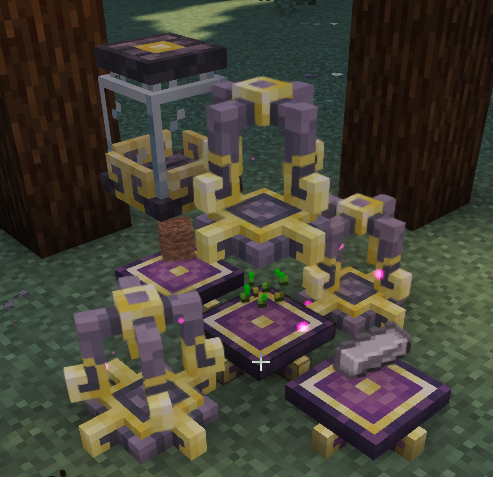
Example: This image is a setup where 3 Imbuement Chambers can use the same 3 platforms to make Earth Essence. This setup also lets all 3 use the same jar of source.
SourceLinks
These devices will produce source and send it to a nearby Source Jar when a condition is met AND the jar has space for it. These 3 are easiest for starting source farms.
But there are a multitude of others that, depending on your automation, could also be beneficial to include:
- Agronomic: whenever a crop grows a stage, a little source is generated
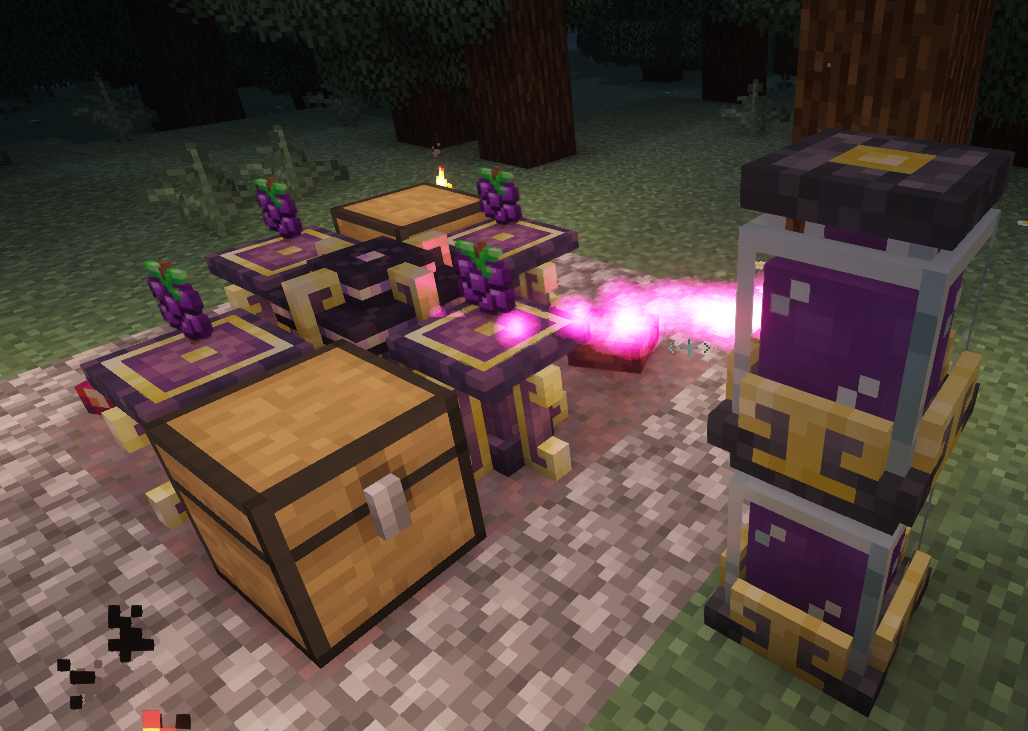
- Mycelial: eats edible things on adjacent platforms/pedestals to produce source, it will also slowly make mycelium and mushrooms below it (may want to source a 3x3 with stone so you don’t get rampant mycelium everywhere). Higher quality foods give more source but the best is Sourceberries. (can use advanced hopper upgrade with chests from Sophisticated Storage to push items onto nearby platforms from multiple sides to automate it too!)
- Vitalic: When nearby animals breed, grow up, or die, it will produce source.
Example of a Mycelial SourceLink set up with Sophisticated Storage:
Enchanted Apparatus
This block is set on top of an Arcane Core as a 2 block structure for magical crafting.
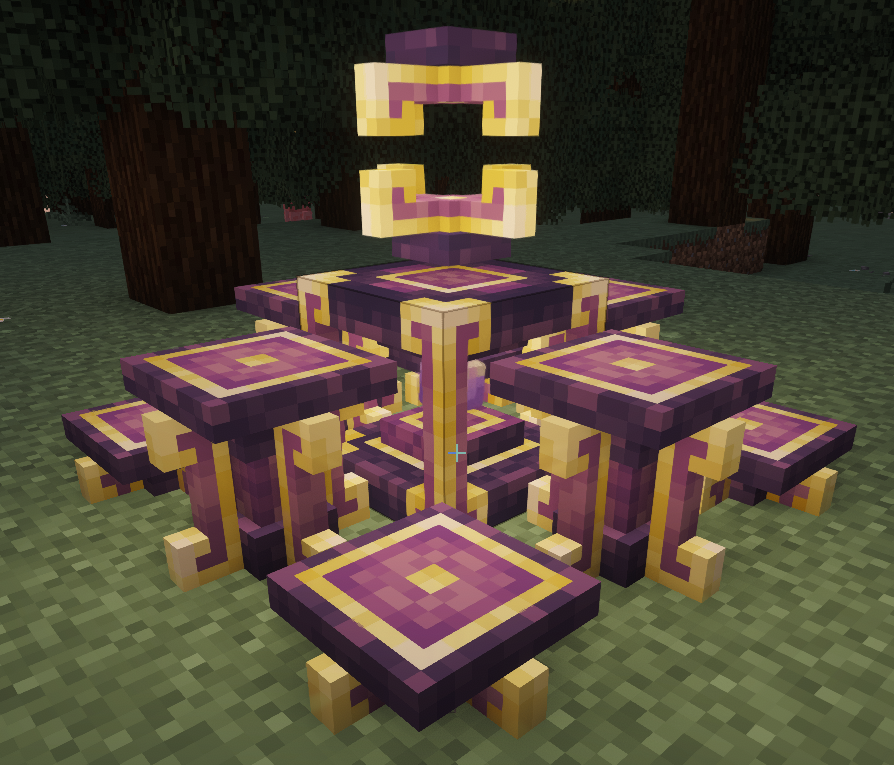
- Up to 8 Arcane Pedestals or Platforms are placed around the Enchanted Apparatus for the items required for the enchanting where the item that will be transformed will go into the Apparatus.
- This process WILL consume the items on the pedestals.
- Some rituals do not cost source, and some do. Your worn notebook or JEI/EMI will show recipes and amount of source needed (each jar is 2000).
- The pedestals and jars within 3 blocks of the Apparatus to work and the items need to all be on the pedestals (order doesn’t matter) before placing the item to transform inside the Apparatus.
Example of my personal preferred setup to save space and easier item placement:
Spellcrafting
Ars Nouveau — Basic to Advanced Spellcrafting
Make your glyphs on the Inscription table - tap the empty table with your spell book, and the menu to select the glyph you want to craft comes up. It will show the items you need to throw onto the table and the experience levels needed to craft.
Tip: you can also shove a bunch of items you need to craft multiple glyphs in a chest next to the table and the table to take what it needs for you!
Sharing is caring: You can also make glyphs you already know more than once but if you’re trying to share the love, try an Annotated Codex instead! You can also craft and learn any tier glyph but you cannot use it if your book can’t handle it.
Glyphs are your building blocks of your spells. And they have categories:
- Form: vessel that deliver the spell (ie: Touch, Self, Projectile); only one may be used per spell
- Effect: what the spell does, can be multiple, but resolved from left to right as placed
- Augment: this changes the Effect glyph directly left of the augment in placement, you can place multiple, but they still will search for the nearest effect to the left. You can stack up the same augment too (ie: 1 AOE augment will make an effect cover a 2x2 area, 2 AOE will make it 3x3) but every augment does have mana costs.
- Exception: There are 5 Augments for the Projectile From - Accelerate, Decelerate, Pierce, Sensitive, Split.
- Filter: A special kind of Augment that can make the closest effect to the left to either only allow or ignore a category of targets even if it would normally be an acceptable target (examples of categories: Aerial, Insect, Summon, Undead)
Some handy glyphs for everyday wizardy:
- Break (Effect) - your shovel, axe, pickaxe, and shovel tool in one (iron level harvest)
- Fell (Effect) - cuts as much of a tree as your mana will allow from one block
- Crusher (Effect) - breaks down stone to gravel or gravel to sand, bonus dye from flowers (tip: use sensitive to effect items on the ground… like getting extra blaze powder from blaze rods)
- Conjure Mageblock (Effect) - Need a boost up a cliff? Or across a gap? Makes a temporary solid arcane block wherever the form sends it. Projectile can make a temp bridge for traveling.
- Amplify (Augment) - increases spell damage, break’s harvest levels, other misc spell effects
- Extract and Luck (Augment)- Silk touch and Fortune/Looting respectively
Basic order of spell glyphs needs to be Form -> Effect -> Augment -> Filter.
Thankfully, the book will prevent you from placing an augment next to a glyph that is not compatible, and it will fade out incompatible glyphs once you place it in the row.
Examples
Ars Nouveau — Example Spells
Dig
Projectile > Break > AOE >AOE.
This makes a digging spell that will hit anything that can be effected by Iron Level tools in a 3x3 pattern centered on where the projectile lands.

Shock
Projectile > Accelerate x2 > Spark > Amplified x2.
A fast projectile that hits a target with an electric spark at 3x power!

Thor’s Rage
More complicated spells need to take in account that multiple of the same effect glyph is wasted due to i-frames of how damage in Minecraft works. Also don’t put two effects directly next to each other, the tick needed to find and resolve an effect will also take augment placement into account. It’s hard to explain but here’s an example:
Projectile> Accelerate > Split x2 > Spark > Amplify > Discharge > AOE > Thunderstorm > Amplify.
Fast THREE projectiles that hits targets with a stronger spark and shocked debuff while then giving discharging more electricity damage and spreading the shocked effect to nearby enemies then striking the ground with lightning at each projectile - all happens in just a matter of a second.

Iron’s Spells ’n Spellbooks
This modpack has Iron’s Spells ’n Spellbooks.
We also have the additional Iron’s-related mods:
- Iron’s Spells’ Recipe Additions: adds more Iron’s-related recipes
Reliquary Reincarnations
https://modrinth.com/mod/reliquary-reincarnations
Nature and Such
We have Botany Pots, and the following mods that expand it:
Food & Farm
Farmer’s Delight
We have Farmer’s Delight, as well as the following add-on mods for it:
- Coffee Delight
- End’s Delight
- Ender’s Delight
- Miner’s Delight
- Ocean’s Delight
- Fruits Delight